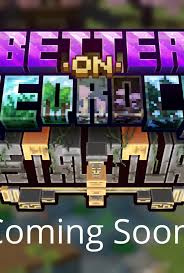
Minecraft Bedrock Edition has captured the hearts of millions with its cross-platform gameplay and endless creative possibilities. If you’re looking to enhance your Minecraft Bedrock experience, the Better on Bedrock addon is a game-changer. This free addon brings exciting features, improved mechanics, and a polished feel to your gameplay. In this article, we’ll dive into what Better on Bedrock is, its features, benefits, recent updates, how it compares to other addons, and some handy tips for getting the most out of it. Let’s explore why this addon is a must-have for Minecraft fans!
What Is Better on Bedrock?
Better on Bedrock is a free addon designed specifically for Minecraft Bedrock Edition, aimed at enhancing the vanilla gameplay experience. Created by the talented developer @XxPoggyisLitxX, this addon introduces new features, tweaks existing mechanics, and adds quality-of-life improvements that make your Minecraft world feel more immersive and dynamic. Whether you’re a survival enthusiast or a creative builder, Better on Bedrock offers something for everyone.
Unlike some addons that require experimental toggles or constant updates, Better on Bedrock is now stable for Minecraft Bedrock 1.21.10 and beyond, meaning you can enjoy its features without fiddling with settings or worrying about compatibility issues. It’s available for free download through platforms like the developer’s Discord or MCPEDL, making it accessible to all players.
Key Features of Better on Bedrock
The Better on Bedrock addon is packed with features that elevate the Minecraft Bedrock experience. Here are some highlights:
1. Enhanced Gameplay Mechanics
Better on Bedrock refines core gameplay elements, such as crafting, mob behaviors, and environmental interactions. For example, it introduces smoother animations, improved mob AI, and tweaks to block interactions, making the game feel more polished and responsive.
2. New Items and Blocks
The addon adds a variety of new items and blocks to spice up your adventures. From unique tools to decorative blocks, these additions give players more creative freedom and utility in survival mode. Think custom weapons or blocks that add flair to your builds!
3. Quality-of-Life Improvements
Tired of clunky mechanics or repetitive tasks? Better on Bedrock includes features like faster crafting, better inventory management, and enhanced villager trading systems. These changes save time and make gameplay more enjoyable.
4. Cross-Platform Compatibility
Since Minecraft Bedrock is all about playing across devices—whether on PC, console, or mobile—Better on Bedrock is optimized to work seamlessly across all platforms. You can enjoy the addon whether you’re on a Nintendo Switch, Xbox, or Android device.
5. No Experimental Toggles Needed
As of the 1.21.10 update, Better on Bedrock no longer requires experimental toggles, making it easier to install and use. This stability ensures it works in both stable releases and preview versions of Minecraft Bedrock, a huge win for players who want a hassle-free experience.
Benefits of Using Better on Bedrock
Why should you download Better on Bedrock? Here are some compelling reasons:
- Free and Accessible: Unlike paid texture packs or mods, Better on Bedrock is completely free, making it a budget-friendly way to enhance your game.
- Improved Immersion: The addon’s tweaks to visuals, sounds, and mechanics create a more immersive Minecraft world.
- Community-Driven Updates: The developer actively engages with the community, ensuring regular updates and bug fixes based on player feedback.
- Versatility: Whether you’re into survival, creative, or multiplayer, Better on Bedrock caters to all playstyles.
- Stable Performance: Recent updates have made the addon more reliable, with no need for experimental settings, reducing crashes or glitches.
Recent Updates to Better on Bedrock
The Better on Bedrock addon has seen significant updates, particularly with Minecraft Bedrock 1.21.10 and 1.21.20. Here’s what’s new:
- Stability in 1.21.10: As of June 2024, the addon became stable, eliminating the need for experimental toggles. This means you can use it on any stable release or preview without compatibility issues.
- 1.21.20 Update: In August 2024, Better on Bedrock was updated to support Minecraft Bedrock 1.21.20, ensuring it remains compatible with the latest game versions. The update is available via the developer’s Discord or MCPEDL (with the latter getting updates soon after release).
- Performance Optimizations: The latest versions include performance tweaks, reducing lag and improving gameplay on lower-end devices.
These updates reflect the developer’s commitment to keeping Better on Bedrock relevant and user-friendly.
How Does Better on Bedrock Compare to Other Addons?
Minecraft Bedrock has a thriving addon community, with options like Faithful, BDcraft, or other gameplay-enhancing addons. So, how does Better on Bedrock stack up?
- Versus Faithful: Faithful focuses on high-resolution textures while keeping the vanilla aesthetic. Better on Bedrock, however, goes beyond visuals, adding new items, mechanics, and quality-of-life features. If you want gameplay changes rather than just a visual overhaul, Better on Bedrock is the better choice.
- Versus Custom Mods: Many custom mods on MCPEDL focus on specific themes (e.g., fantasy or sci-fi). Better on Bedrock is more general-purpose, enhancing the core game without drastically altering its vibe, making it ideal for players who want a vanilla-plus experience.
- Versus Vanilla Bedrock: Compared to the base game, Better on Bedrock feels like a polished upgrade. It keeps the essence of Minecraft intact while addressing common player pain points, like clunky crafting or limited block variety.
Pros and Cons of Better on Bedrock
Pros
- Free to download and use
- Stable and compatible with the latest Minecraft Bedrock versions
- Enhances gameplay without overwhelming the vanilla experience
- Regular updates from an active developer
- Works across all Bedrock platforms
Cons
- Limited availability on some platforms (e.g., MCPEDL updates may lag slightly behind Discord)
- May not appeal to players who prefer a completely vanilla experience
- Some features might feel overwhelming for new players
Tips for Using Better on Bedrock
To get the most out of Better on Bedrock, here are some user tips:
- Download from Trusted Sources: Get the addon from the developer’s Discord or MCPEDL to ensure you’re using the latest, safest version.
- Check Compatibility: While the addon is stable for 1.21.10+, double-check your Minecraft version to avoid issues.
- Experiment with Features: Take time to explore new items and blocks in creative mode to understand their uses before diving into survival.
- Join the Community: The developer’s Discord is a great place to connect with other players, share feedback, and stay updated on new releases.
- Backup Your Worlds: Before installing any addon, back up your Minecraft worlds to avoid potential data loss.
How to Download Better on Bedrock
Downloading Better on Bedrock is simple:
- Visit the developer’s Discord server or check MCPEDL for the latest version.
- Download the addon file (usually a .mcaddon or .zip).
- Import the file into Minecraft Bedrock by double-clicking or using the in-game resource pack menu.
- Activate the addon in your world settings and enjoy!
The developer regularly posts download links on X, so following @XxPoggyisLitxX can keep you in the loop for the latest updates.
Final Thoughts
The Better on Bedrock addon is a fantastic way to elevate your Minecraft Bedrock experience without breaking the bank. With its mix of new items, improved mechanics, and quality-of-life tweaks, it’s perfect for players who want a richer, more polished version of the game. Its recent updates ensure compatibility and stability, while the developer’s active engagement with the community guarantees ongoing improvements. Whether you’re building epic structures or surviving in the wild, Better on Bedrock makes every moment more enjoyable