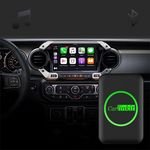
In today’s fast-paced world, staying connected while driving is a must. Whether you’re navigating through city streets or streaming your favorite playlist, the Carlinkit APK for Android offers a game-changing solution for integrating your smartphone with your car’s infotainment system. This article dives into everything you need to know about the Carlinkit APK, including its purpose, features, benefits, installation tips, and more. Let’s explore how this app can transform your driving experience!
What is the Carlinkit APK?
The Carlinkit APK is a free Android application designed to enhance in-car connectivity by enabling seamless integration with Android Auto and MirrorLink. Developed by Carlinkit, a leading brand in wireless CarPlay and Android Auto adapters since 2014, this app works with Carlinkit’s range of devices to connect your smartphone to your car’s infotainment system wirelessly or via USB. Whether you’re using navigation apps, making hands-free calls, or streaming media, Carlinkit ensures a smooth and safe driving experience.
The app is particularly useful for drivers with aftermarket Android head units (version 4.4.2 or higher) or vehicles with wired Android Auto or CarPlay systems that they want to convert to wireless. With over 1,000 downloads in the last 30 days and a compact size of around 11.95 MB, the Carlinkit APK is lightweight, user-friendly, and widely compatible.
Key Features of the Carlinkit APK
The Carlinkit APK is packed with features that make it a must-have for tech-savvy drivers. Here’s a closer look at what it offers:
1. Seamless Android Auto Integration
The app enables your Android device to connect effortlessly with Android Auto, allowing you to access navigation apps like Google Maps, make calls, and use apps like Spotify or YouTube Music safely while driving.
2. MirrorLink Functionality
With MirrorLink, you can mirror your phone’s screen onto your car’s display for a larger, more accessible view. This is perfect for streaming videos or accessing apps during breaks.
3. Wide Device Compatibility
The Carlinkit APK supports a range of Carlinkit devices, including the AI Box, 5.0 Air, Auto A2A, HDMI Adapter, Mini SE, and Tesla T2C. This versatility ensures it works with various car models and setups.
4. High-Definition Streaming
Enjoy crisp visuals with HD screen mirroring, making your in-car entertainment experience more immersive. Whether it’s navigation or media, the app delivers high-quality visuals.
5. Stable and Reliable Connectivity
The app ensures uninterrupted Bluetooth or Wi-Fi connections, even during long drives, so you won’t face annoying dropouts or lag.
6. User-Friendly Interface
Designed with simplicity in mind, the Carlinkit APK is easy to navigate, making it accessible for users of all tech levels.
Benefits of Using the Carlinkit APK
Why should you download the Carlinkit APK? Here are some compelling reasons:
- Convenience: Say goodbye to tangled USB cables. The app allows wireless connectivity, making it easier to connect your phone to your car’s infotainment system.
- Safety: By integrating with Android Auto, the app promotes hands-free operation, letting you focus on the road while accessing apps and calls.
- Versatility: From navigation to multimedia streaming, the app supports a wide range of functions, enhancing your driving experience.
- Cost-Effective: The Carlinkit APK is free to download, and when paired with a Carlinkit device, it’s a budget-friendly alternative to upgrading your car’s infotainment system.
How to Download and Install the Carlinkit APK for Free
Downloading and installing the Carlinkit APK is straightforward, but it’s important to follow the right steps to ensure a smooth setup. Here’s how you can do it:
Method 1: Download from the Google Play Store
- Open the Google Play Store on your Android device.
- Search for “Carlinkit” and locate the official app by Devlogix Tech.
- Tap Install to download the app (version 1.2 as of August 2025, 11.95 MB).
Method 2: Download from the Carlinkit Official Website
- Visit the Carlinkit official website (www.carlinkit.com) or the Carlinkit Factory Store (www.carlinkitfactory.com).
- Navigate to the Downloads section and find the AutoKit.apk or Carlinkit.apk (version 2024.08.01.1503 for Android 4.2.2+).
- Download the APK file to your device or a USB drive.
- If using a USB drive, transfer the file to your car’s Android head unit and install it via the File Manager.
Method 3: Download via Car Browser
- On your car’s Android head unit, open the browser and enter the download URL provided by Carlinkit (e.g., http://121.40.123.198:8899/).
- Download the AutoKit.apk and install it from the car’s Download Directory.
Note: You may need to enable Unknown Sources in your Android settings to install APKs from sources other than the Play Store. Always download from trusted sources like the official Carlinkit website or APKPure to avoid security risks.
How to Use the Carlinkit APK
Once installed, using the Carlinkit APK is a breeze:
- Install the App: Ensure the APK is installed on your car’s Android head unit or your smartphone.
- Connect Your Device: Pair your phone with a Carlinkit device (e.g., AI Box or 5.0 Air) via Bluetooth or Wi-Fi. The default Bluetooth PIN is usually 0000.
- Access Features: Open the app on your car’s screen, connect your phone, and enjoy Android Auto or MirrorLink features like navigation, calls, or media streaming.
Pros and Cons of the Carlinkit APK
Pros
- Free to download and use.
- Supports both wireless Android Auto and CarPlay (with compatible devices).
- Stable and reliable connectivity for long drives.
- Compact app size (11.95–14.1 MB).
- Regular updates ensure compatibility with the latest devices and systems.
Cons
- Requires a compatible Carlinkit device, which may cost $70–$90.
- Firmware updates can be tricky, sometimes requiring manual sideloading of apps like AutoKitools.
- Not compatible with all car systems (e.g., Pioneer, Alpine, or Kenwood head units).
- Some users report occasional lag with certain car models.
Comparing Carlinkit APK with Alternatives
The Carlinkit APK stands out, but how does it compare to alternatives like CarLink by Unimax Electronics or Autokit by Carlinkit?
- CarLink (Unimax Electronics): This app is tailored for specific in-vehicle infotainment systems and lacks the broad device compatibility of Carlinkit. It’s less versatile for users with Carlinkit hardware.
- Autokit APK: Also developed by Carlinkit, this is an earlier version required for specific devices like the CPC200-CCPA. While functional, it’s less polished than the newer Carlinkit APK (version 1.2).
The Carlinkit APK’s advantage lies in its compatibility with a wide range of Carlinkit devices and its focus on both Android Auto and MirrorLink, making it more versatile than competitors.
User Tips for the Best Experience
- Update Regularly: Check for firmware and app updates on the Carlinkit website to ensure optimal performance.
- Verify Compatibility: Confirm your car’s head unit runs Android 4.4.2 or higher before downloading.
- Use Official Sources: Avoid third-party APK sites to prevent downloading knock-off or unsafe versions.
- Test Bluetooth Stability: If you experience connectivity issues, re-pair your device and ensure no other Bluetooth devices are interfering.
Recent Updates (2025)
The latest Carlinkit APK (version 1.2, August 2025) includes minor bug fixes and improved compatibility with devices like the Carlinkit 5.0 Air and AI Box. The AutoKit.apk (version 2024.08.01.1503) also received updates to support Android 13 systems, ensuring broader compatibility with newer car models.
Final Thoughts
The Carlinkit APK is a must-have for drivers looking to upgrade their in-car connectivity without breaking the bank. With its seamless Android Auto and MirrorLink integration, wide device compatibility, and user-friendly interface, it’s a reliable choice for transforming your driving experience. While it requires a Carlinkit device and may have a learning curve for firmware updates, the benefits of wireless connectivity and HD streaming make it worth the effort.
Ready to take your drive to the next level? Download the Carlinkit APK from the Google Play