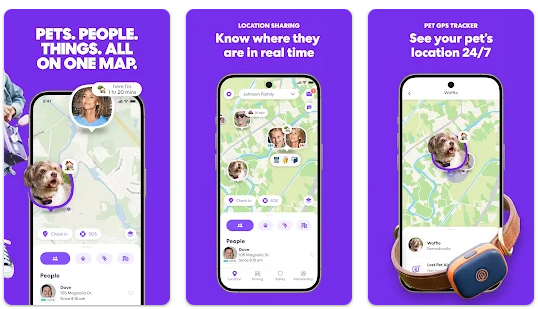
In today’s fast-paced world, staying connected with your loved ones is more important than ever. Whether it’s making sure your kids arrive safely at school, checking in on elderly parents, or coordinating meetups with family members, a family tracking app can bring peace of mind. If you’re wondering how to join your family tracker and use it effectively, this guide will walk you through everything you need to know.
What Does Join Your Family Tracker Mean?
When you join your family tracker, you become part of a shared location network. This network allows family members to see each other’s real time location through a mobile app. Popular family tracker apps include Life360, Google Family Link, Find My (Apple), and other GPS based tracking tools.
Once you join, you can:
-
Share your live location
-
Receive safety alerts
-
Monitor driving activity (in some apps)
-
Set up location-based notifications
-
Communicate within the app
The goal isn’t surveillance it’s safety, coordination, and peace of mind.
How to Join Your Family Tracker
Joining a family tracker is usually simple. While steps may vary slightly depending on the app, the general process is similar.
1. Download the Family Tracker App
First, download the tracking app from the Google Play Store or Apple App Store. Make sure you’re installing the official version.
2. Create or Sign In to Your Account
You’ll need to register with your email address or phone number. Some apps allow you to sign in using Google or Apple ID for convenience.
3. Accept an Invitation
Most family trackers work with invite codes or links. A family member (usually the admin) will send you an invitation link.
-
Tap the invitation link.
-
Accept the request.
-
Allow location permissions.
Once accepted, you officially join your family tracker group.
4. Enable Location Services
For accurate tracking, you must:
-
Turn on GPS
-
Allow Always location access
-
Enable background app refresh
Without these permissions, the tracker won’t function properly.
Key Features of Family Tracking Apps
Understanding features helps you use the app more effectively.
Real-Time Location Sharing
This is the core feature. You can see exactly where your family members are on a live map. Updates typically refresh every few seconds.
Example: Parents can check if their child has reached school safely.
Geofencing Alerts
Geofencing lets you set specific locations like:
-
Home
-
School
-
Workplace
You’ll receive notifications when someone enters or leaves those areas.
Emergency SOS Button
Many family tracking apps include an SOS feature. If someone feels unsafe, they can press the emergency button, instantly notifying the entire family group.
Driving Reports
Some advanced apps provide:
-
Speed monitoring
-
Hard braking alerts
-
Driving behavior insights
This feature is especially useful for families with teen drivers.
Battery Monitoring
Family trackers often show the battery level of each member’s phone. This prevents panic if someone’s phone dies unexpectedly.
Benefits of Joining a Family Tracker
Improved Family Safety
Knowing where your loved ones are in real time can reduce stress and improve safety.
Better Communication
Instead of constant Where are you? messages, you can simply check the app.
Peace of Mind for Parents
Parents feel reassured when children are traveling alone or returning home late.
Support for Elderly Family Members
Tracking can help monitor older relatives who may need assistance.
Privacy and Security Considerations
While family tracking apps are helpful, privacy is important.
Here are some tips:
-
Only join trusted family groups.
-
Avoid sharing location publicly.
-
Review app permissions regularly.
-
Use strong passwords for your account.
Remember, a family tracker should always be used with consent. Open communication builds trust and avoids misunderstandings.
Common Issues When Joining a Family Tracker
Sometimes users face minor issues. Here’s how to fix them:
Location Not Updating
-
Check GPS is enabled.
-
Ensure internet connection is active.
-
Allow background data usage.
Invitation Link Not Working
-
Ask for a new invite.
-
Update the app to the latest version.
Battery Draining Fast
-
Reduce update frequency (if the app allows).
-
Enable battery optimization settings.
Best Practices for Using a Family Tracker
To get the most out of your family tracker:
-
Set clear expectations about tracking.
-
Use geofencing for key locations.
-
Turn on emergency features.
-
Keep the app updated.
The goal is coordination, not control.
Is Joining a Family Tracker Worth It?
For most families, the answer is yes. Whether you’re managing busy schedules or focusing on safety, a family tracking app can simplify everyday life. The key is using it responsibly and respectfully.
When you join your family tracker, you’re choosing connection over confusion and safety over uncertainty.
Final Thoughts
Joining a family tracker is a simple yet powerful way to stay connected with your loved ones. From real-time GPS tracking to emergency alerts and location notifications, these apps offer valuable tools for modern families.
If used thoughtfully, a family tracker can strengthen trust, improve communication, and provide peace of mind all with just a few taps on your phone.
Family Connect GPS
Take the time to set it up correctly, discuss expectations with your family, and enjoy the benefits of staying connected wherever life takes you.