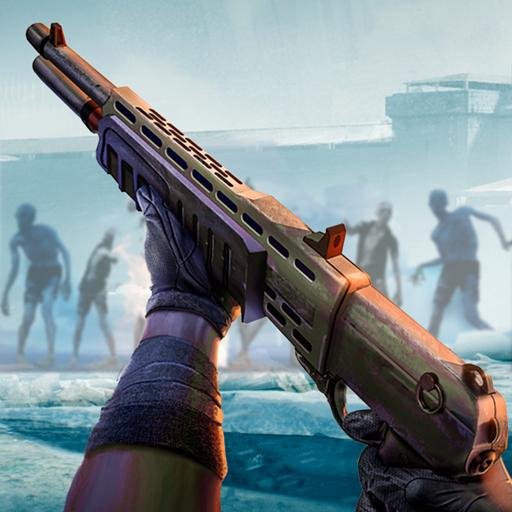
Hey there, zombie-slaying enthusiasts! If you’re looking for an action-packed, heart-pounding mobile game to play on the go, Zombie Fire 3D: Offline Game might just be your next obsession. This first-person shooter (FPS) throws you into a post-apocalyptic world overrun by the undead, where your survival depends on quick reflexes, strategic thinking, and a massive arsenal of weapons. In this article, we’ll dive into everything you need to know about the Zombie Fire 3D Offline Game APK download for mobile, including its features, benefits, updates, and tips to dominate the zombie hordes. Let’s lock and load!
What Is Zombie Fire 3D: Offline Game?
Zombie Fire 3D: Offline Game is a thrilling FPS developed by VNG Game Studios, the creators of popular titles like DEAD TARGET and ZOMBIE HUNTER. Set in a world ravaged by a zombie apocalypse, you play as a survivor tasked with mowing down hordes of bloodthirsty zombies. The game’s standout feature? It’s fully playable offline, so you can blast zombies anytime, anywhere—no Wi-Fi required. Available for both Android and iOS, this game combines stunning 3D graphics, intuitive controls, and intense gameplay to deliver a truly immersive experience.
Whether you’re a fan of zombie games, shooting games, or just love high-stakes action, Zombie Fire 3D offers something for everyone. With its challenging story mode, endless survival battles, and customizable weapons, it’s no wonder players are hooked.
Why Download the Zombie Fire 3D Offline Game APK?
Downloading the Zombie Fire 3D Offline Game APK is a great choice for mobile gamers who want a seamless, uninterrupted experience. Here’s why this game stands out:
Key Features of Zombie Fire 3D
- Offline Gameplay: No internet? No problem! Play through dozens of levels without needing a Wi-Fi connection, perfect for commutes, travel, or spotty network areas.
- Stunning 3D Graphics: The game’s visuals are a cut above, with destructible environments and realistic zombie designs that make every battle feel cinematic.
- Massive Weapon Arsenal: From rifles and flamethrowers to Gatling guns, you’ll have access to a variety of upgradable weapons, each with unique strengths and weaknesses.
- Universal Weapon Upgrade System: Upgrade one gun, and all your weapons get the same level boost, letting you customize your playstyle without losing firepower.
- Challenging Game Modes: Choose between story mode for a narrative-driven experience or survival mode to test your endurance against endless zombie waves.
- Dynamic Combat: Face diverse zombie types, from standard walkers to massive bosses that throw rocks or dodge bullets, keeping you on your toes.
- Tactical Strategy: Use bombs, environmental traps like gas tanks, or even vehicles like tanks and helicopters to wipe out zombies in creative ways.
Benefits of Playing Zombie Fire 3D Offline
The biggest perk of Zombie Fire 3D is its accessibility. Since it’s an offline game, you can dive into the action without worrying about data usage or connectivity issues. The game’s 3D graphics and destructible environments create a vivid, immersive world that feels like you’re in a zombie movie. Plus, the ability to upgrade weapons and unlock new ones keeps the gameplay fresh and rewarding.
For players who love a challenge, the game’s progressive AI means zombies get smarter and tougher as you advance, forcing you to adapt your strategies. Whether you’re planting bombs for crowd control or sniping from a distance, there’s always a new way to tackle the undead.
How to Download Zombie Fire 3D Offline Game APK for Android
Ready to jump into the apocalypse? Here’s how to safely download the Zombie Fire 3D Offline Game APK for your Android device:
- Visit a Trusted Source: Head to a reputable site like Uptodown, APKPure, or the Google Play Store to download the APK file.
- Enable Unknown Sources: Go to your Android settings, navigate to Privacy or Security, and enable “Unknown Sources” to allow APK installations.
- Download the APK: Click the download link for the latest version (e.g., 1.36.3 as of July 2025).
- Install the Game: Open the downloaded APK file from your Downloads folder and follow the on-screen instructions to install.
- Start Playing: Launch the game and get ready to blast some zombies!
Note: Be cautious when downloading APKs from unofficial sources. Stick to trusted platforms and scan files with antivirus software to avoid malware. Google Play’s warning about external APKs is a reminder to prioritize safety.
For iOS users, you can download Zombie Fire 3D directly from the App Store, requiring iOS 13.0 or later.
MOD APK vs. Original Version: What’s the Difference?
The Zombie Fire 3D Offline Game MOD APK is a modified version of the game that offers perks like unlimited money, grenades, or a mod menu for enhanced gameplay. With unlimited currency, you can unlock premium weapons and upgrades without grinding, making it easier to survive tougher levels. Some MOD versions also remove ads for a smoother experience.
However, there are trade-offs. MOD APKs aren’t available on official app stores and may pose security risks if downloaded from unverified sources. Additionally, using a MOD version might violate the game’s terms of service, potentially leading to bans in online modes (though Zombie Fire 3D is primarily offline). The original version, available on Google Play or the App Store, is safer and includes regular updates from VNG Game Studios, like bug fixes and new levels.
If you’re okay with grinding for upgrades and prefer a legit experience, stick with the original. If you want a faster track to powerful gear, the MOD APK might be tempting—but proceed with caution.
Comparing Zombie Fire 3D to Other Zombie Games
How does Zombie Fire 3D stack up against other zombie shooters like PUBG MOBILE, Free Fire, or DEAD TARGET? Unlike battle royale games like PUBG MOBILE or Free Fire, which focus on multiplayer competition, Zombie Fire 3D is a single-player, offline FPS with a focus on zombie-slaying action. Compared to DEAD TARGET, another VNG title, Zombie Fire 3D offers more advanced graphics and a universal weapon upgrade system, making it feel like an evolved version.
The game’s static gameplay (no character movement) might feel limiting compared to titles like GTA: Vice City or SIGMAX, where you explore open worlds. However, this simplicity makes Zombie Fire 3D easy to pick up and perfect for quick gaming sessions.
Pros and Cons of Zombie Fire 3D
Pros
- Offline Play: Ideal for gaming on the go without Wi-Fi.
- Impressive Graphics: 3D visuals and destructible environments enhance immersion.
- Variety of Weapons: A huge arsenal keeps combat exciting and customizable.
- Challenging AI: Smart zombies and tough bosses make every level intense.
- Free to Play: No upfront cost, though it includes optional in-app purchases.
Cons
- Static Gameplay: You can’t move your character, which may feel restrictive for some players.
- Ads in Free Version: Ads can interrupt gameplay, especially at higher levels (around Level 250).
- Weapon Balance Issues: Some high-cost weapons, like the M134 minigun, overheat quickly and feel underpowered.
- Short Levels at Higher Stages: Later levels can last as little as 20–30 seconds, which may frustrate players.
Tips for Mastering Zombie Fire 3D
- Stick to Reliable Weapons: The flamethrower is a fan favorite for its consistent damage output. Avoid weapons like the M134 minigun, which overheats quickly.
- Use Environmental Traps: Blow up gas tanks or activate explosive stations to take out large zombie groups efficiently.
- Upgrade Strategically: Focus on upgrading weapons that suit your playstyle, as the universal upgrade system boosts all guns equally.
- Practice Aiming: Since you can’t move, precise aiming is key. Rotate the camera quickly to spot zombies coming from all angles.
- Try the MOD APK for Testing: If you’re curious about premium weapons, test a MOD APK on a secondary device to avoid risking your main account.
Recent Updates and What’s New
As of July 2025, the latest version of Zombie Fire 3D (1.36.3) includes:
- New Battlefields: Fresh levels set in oil fields and military bases.
- Bug Fixes: Smoother gameplay with fewer crashes or interruptions.
- Improved Performance: Enhanced action for a sharper, more intense experience.
These updates make the game more polished and engaging, addressing player feedback about short levels and weapon performance.
Final Thoughts: Is Zombie Fire 3D Worth Downloading?
If you’re a fan of zombie shooters and want a game you can play anywhere, Zombie Fire 3D: Offline Game is a fantastic pick. Its offline mode, stunning graphics, and diverse weapons make it a standout in the genre. While the static gameplay and ads might bother some, the heart-pounding action and strategic depth keep you coming back for more. Whether you go for the official version or try a MOD APK for extra perks, this game delivers hours of zombie-blasting fun